
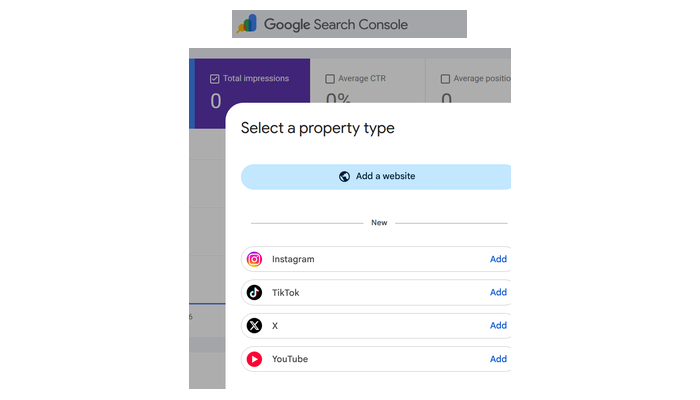
Google Search Console’s platform properties are now available globally. You can finally see which search terms drive traffic to your Instagram, TikTok, X, and YouTube content.
What Changed
Since July 7, 2026, Google has been rolling out “platform properties” — a new Search Console property type for social and video accounts. As of July 29, 2026, this feature is globally available to everyone.
This means creators and business owners can now track:
- Clicks — how many people found your social posts via Google Search
- Impressions — how often your content appeared in search results
- Search terms — the exact queries driving traffic to your posts
- Performance trends — which content is gaining or losing search visibility
Why This Matters
Until now, Search Console only tracked website data. If you posted a YouTube video or Instagram Reel that ranked on Google, you had no idea which searches sent people there.
Now you do.
This is valuable data for:
- Creators — understand what topics and formats Google rewards, then double down
- Business owners — see if your social content is actually driving discoverable traffic
- SEO professionals — cross-reference social performance with website data for a complete picture
What You Can Do Now
Spot trending content: Use the 24-hour filter to catch sudden traffic spikes from Google Search to your recent posts. Cross-promote trending content on other platforms while it’s hot.
Analyse across platforms: Export performance data from multiple properties into a single spreadsheet. Compare how your content performs side-by-side on YouTube, Instagram, X, or TikTok.
Optimise existing content: Identify older videos regaining search traction. Pin those to your feed or expand them into a part two.
Compare formats: Evaluate short-form versus full-length videos, or compare playlist performance.
How to Set It Up
- Go to Google Search Console
- Click Add property
- Select Instagram, TikTok, X, or YouTube
- Follow the verification steps to authorise the connection
- Wait a few days for data to appear
Repeat for each platform account you want to track.
Related: Connect Social Accounts to Search Console → | Optimise for AI Search →